
On this page
SEO
Clay prepares every page for search engines and link previews on its own. Each page is pre-rendered to complete HTML, so crawlers see the full content without running JavaScript.
#What every page gets
| Tag | Content |
|---|---|
<title> |
Page title and site title: “Search · Clay” |
<meta name="description"> |
The page’s description, see below |
og:title, og:description, og:type, og:site_name |
The same for link previews in chats and social networks |
<html lang> |
The language of the page |
article:modified_time |
The date of the last change, from git |
With siteURL set, pages also get:
| Tag | Content |
|---|---|
<link rel="canonical"> |
The page’s full address, so search engines know which URL to show |
og:url |
The same, for link previews |
| Breadcrumbs (JSON-LD) | Where the page sits, shown in search results as “Clay › Features › SEO” |
hreflang links |
The page’s translations |
og:image, twitter:card |
The page’s social image |
#Descriptions
The description is the short text search engines show under a result. Clay takes the first of:
descriptionin the page’s front matter,- the first paragraph of the page,
- the description of the start page,
docs/index.md.
It is cut to 160 characters at a word boundary. A good description says in one or two sentences what the page answers:
---
description: Deploy a Clay site to GitHub Pages with a workflow that builds on every push.
---
A coding agent can write the missing descriptions:
Read https://clay-doc.github.io/clay-example-repo/features/seo.md. Then give every
page in docs/ without a description one: one or two sentences, at most 160
characters, that say what the page answers. Find the pages with
`npx clay edit list --json` and set each with `npx clay edit set`.
#Social images New in Clay 4
A link to a page, shared in a chat or a social network, shows a picture of it: the site’s logo and title, the section, the page’s title and its description, in the colors of the dark theme.
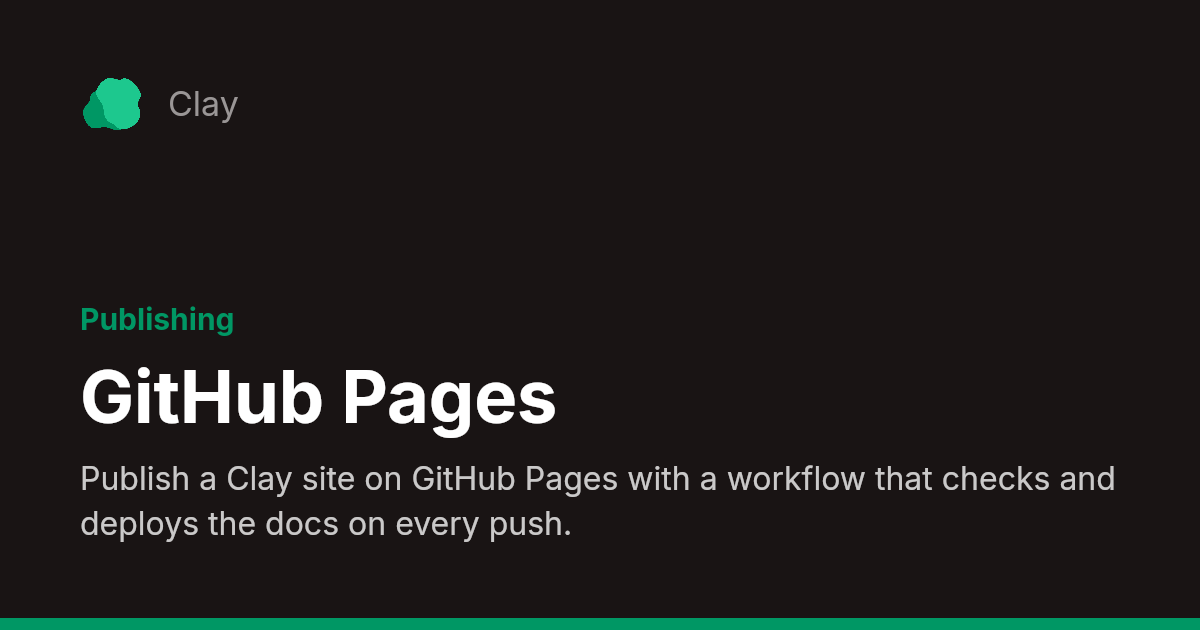
Clay draws them when it builds the site, one for each page, at /_clay/social/<page>.png. They need siteURL, since link previews only load images by their full address. To build without them:
socialImages: false- Every script, and emoji. Clay brings the font for Latin, Greek and Cyrillic letters. For other scripts, like Arabic, Hebrew, Hindi, Thai, Chinese, Japanese or Korean, and for emoji, the build fetches just the letters the images use from Google Fonts, once, and keeps them in
node_modules/.cache; readers never contact Google. Pages written from right to left get a mirrored image. - Without a connection, texts whose fonts could not be fetched are left off their images, and the next build tries again.
- Drawing is quick, dozens of pages a second, and Clay keeps the images in the cache: it only draws them again when a page’s title or description changes.
- Skia draws them, the graphics engine of Chrome, through a package that comes ready-built for macOS, Linux and Windows. On a platform it has no build for, Clay builds the site without social images and says so.
#Sitemap and robots.txt
With siteURL, Clay writes sitemap.xml with every page and the date of its last change, and robots.txt pointing to it, and to llms.txt for language models.
siteURL: "https://my-org.github.io"
baseURL: "/my-project/"
The sitemap is then at https://my-org.github.io/my-project/sitemap.xml. Submit it in Google Search Console and Bing Webmaster Tools.
#Sites under a path
Search engines only read robots.txt at the root of a domain, like https://my-org.github.io/robots.txt. A site under a path, like /my-project/, cannot place one there, so search engines do not learn about its sitemap from it. Clay helps in three ways:
clay buildreminds you. WithsiteURLand abaseURLother than/, the build shows the sitemap’s address to submit:● Loaded 42 pages from docs │ ℹ robots.txt only counts at the root of a domain; submit https://my-org.github.io/my-project/sitemap.xml in Google Search Console and Bing Webmaster ToolsEvery page links to the sitemap in its head (
<link rel="sitemap">), for tools that look for it there.Search engines find your pages anyway by following links; the sitemap makes it faster and complete.
Submit the sitemap once in Google Search Console and Bing Webmaster Tools. If you own the site at the root, like the my-org.github.io repository, you can instead add a line to its robots.txt: Sitemap: https://my-org.github.io/my-project/sitemap.xml. With your own domain, the site is at the root and its robots.txt works as it is.
#Versions and translations
- Pages of older versions are regular pages with their own URLs and sitemap entries.
- A page that is not translated yet shows the original text in the other language. Its canonical link points to the original, and it is left out of the sitemap, so search engines do not see duplicate content.